
Python was’t a language I set out to learn for its own sake. I approached it as a tool that could help automate engineering calculations, validate my own work, and reinforce concepts from my mechanical engineering studies.
Engineering studies mean endless manual equations. From Reynolds number calculations, Bernoulli’s equation, differential manometers, or beam analysis, the process is highly repetitive with the same formulas being used, just with different raw inputs. During my end-of-semester exam revision period, I saw an opportunity to learn a new technical skill while improving my understanding of the concepts I was studying.
Instead of trying to learn an entire programming language from scratch, I applied the 80/20 rule: identify the core concepts that produce the majority of practical results, then focus on applying them.
Why Learn Python?
Programming isn’t the only technical area where i take this approach. Throughout my studies, I’ve often tried to get ahead of the syllabus by learning core software early. For example, before beginning CAD-heavy engineering subjects, I spent time learning the fundamentals of SolidWorks after a period of experimenting with Shapr3D. This proactive approach to learning industry-standard software is something I explored when analysing my transition from hobbyist design tools.
My experience with learning Python followed a similar pattern.
I wasn’t starting completely blind. My Certificate III in Screen & Media studies included basic HTML and CSS coursework, and I had also experimented with JavaScript through Codecademy. I didn’t stick with JavaScript for long, but it gave me some familiarity with foundational concepts such as variables, conditional statements, and basic structure.
During the 2025–2026 summer break, I very briefly explored Python and learned enough to understand variables before shifting my attention back to SolidWorks. Several months later, during exam revision, I returned to Python. This time, I had the specific goal to use it to solve engineering problems.
Identifying the Core 20%
When planning my learning approach, I deliberately ignored most of the language. Instead, I focused on a small group of foundational concepts that appeared repeatedly in practical engineering applications:
- Variables
- User input
- Conditional statements (
if,elif,else) - Loops
- Functions
- Lists
My reasoning was straightforward: if I could combine these six building blocks effectively, I could build functional scripts for my coursework.
I had no interest in becoming a software developer within a few weeks. The goal was to become competent enough to automate formulas and reinforce engineering concepts.
To get started, I used FreeCodeCamp to learn the syntax. Once I understood the fundamentals, I moved to Codecademy’s Workspace environment, where I could start creating my own programs rather than following guided exercises.
Learning Through Engineering Problems
An advantage of studying engineering is that there is an endless supply of complex problems to play with. Instead of building generic beginner scripts, I focused exclusively on calculations that were directly related to my coursework.
My first working tool calculated the Reynolds number and classified fluid flow regimes. Despite its simplicity, it introduced important programming concepts such as user input, functions, conditional logic, and repeated calculations.
From there, the scope quickly grew into an integrated suite of revision tools including:
- Reynolds number classification
- Continuity equation calculations
- Hydrostatic pressure calculations
- Ideal Gas Law calculations
- Differential manometer calculations
- Bernoulli’s equation calculations
To keep it organised, I had split the tools into distinct program modules. I decided that when running the programs, it was more efficient to integrate them into a clean, menu-driven main application.
At that point, I was no longer just learning syntax. I was actively building software that performed useful engineering calculations.
Using Python as a Validation Tool
An unexpected benefit was the ability to audit my own handwritten calculations.
Engineering coursework demands full, meticulous derivations. Code cannot replace that manual process, nor should it for an exam. However, it can provide an independent system to verify the final numbers.
This became particularly useful during exam revision.
While I was working on a differential manometer problem, I scripted its governing equation and compared the result against my handwritten calculations. The program’s output matched my handwritten solution, but it disagreed with the official worked solutions file provided to the class.
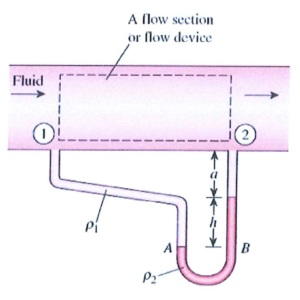
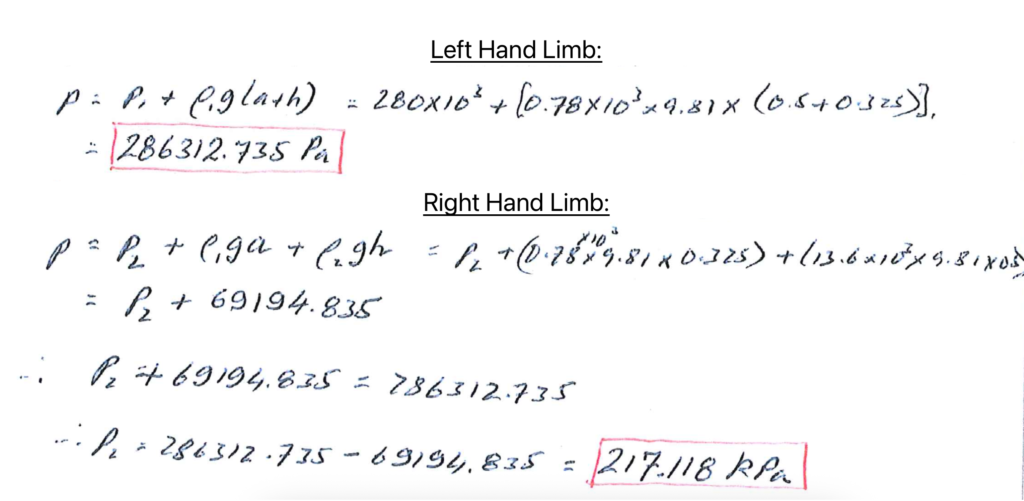
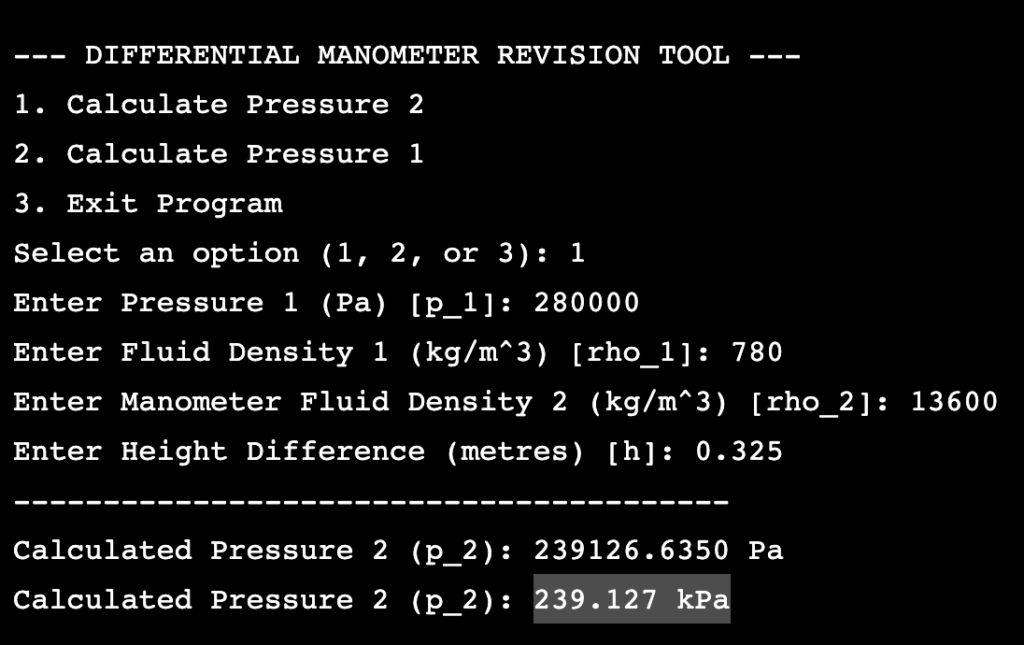
Double-checking line by line revealed that the script was right; the official sheet contained a clear flaw in variable substitution.
That experience reframed how I look at code. Computational tools should not be used to replace human understanding and thought, but as a tool for validation and quality assurance.
Automating Beam Analysis
Things got more interesting when I started experimenting with loops. One of my learning activities involved calculating bending moments along a simply supported beam subjected to a central point load.
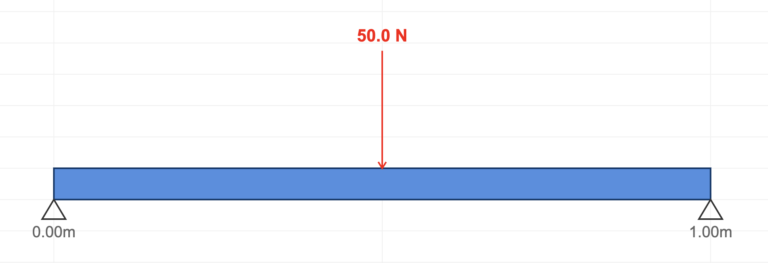
Instead of calculating only a handful of locations, I used a loop to calculate one hundred evenly spaced points along the beam span. The script then logged each value, identified the maximum bending moment, and isolated its position. I later expanded the script to include shear force calculations as well.
    # Loop from steps 0 to 100
    for step in range(total_steps + 1):
        position = step * step_size_m

        if position < load_position_m:
            bending_moment = reaction_force * position
            shear_force = reaction_force

        elif position == load_position_m:
            bending_moment = reaction_force * position
            shear_force = 0.0

        else:
            bending_moment = (reaction_force * position) - (force_n * (position
            - load_position_m))
            shear_force = reaction_force - force_n

        print(f"{position:13.1f} | {shear_force:15.1f} | {bending_moment:21.1f}")


        bending_moments_list.append((position, bending_moment))
        shear_forces_list.append((position, shear_force))
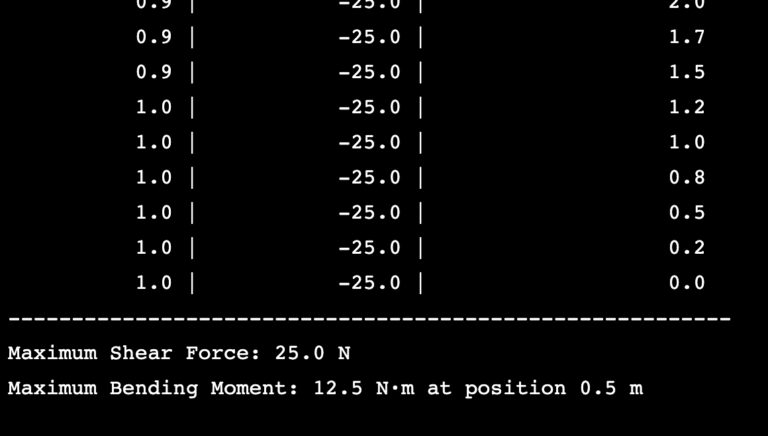
The mathematical complexity here wasn’t high, but the project proved that coding becomes increasingly valuable as the number of calculations grows.
Calculating a single point on a beam by hand is easy. Doing it one hundred times manually becomes repetitive and tedious. Doing it one thousand is completely impractical. Automation handles that scaling effortlessly.
This project introduced a computational simulation mindset. In advanced structural analysis, the goal is rarely to look at a single isolated point; you need to map out structural behaviour across the entire physical component, which is the same methodology that underlies computational mechanics tools like Finite Element Analysis (FEA).
Reflections on Learning
Looking back, the most effective part of the process wasn’t learning Python syntax. It was learning through application.
Instead of spending weeks studying programming theory out of context, I immediately applied new concepts to engineering maths problems that I already understood. Every variable was mapped to a real physical property, every line of code mirrored a textbook derivation, and every output could be checked manually.
This shift from passive consumption to active execution reinforced the same conclusion I reached when evaluating handwriting vs typing notes: true comprehension requires active processing. Simply consuming information is rarely enough. Real understanding happens when concepts are tested, broken, and used to solve problems.
The process also reinforced a lesson that extends beyond programming. Whether learning CAD software, managing engineering projects, or developing technical skills, I consistently find that progress accelerates when learning is tied to a real objective rather than an abstract classroom exercise.
Beyond Python
My primary motivation for learning Python is strictly focused on engineering applications.
It has completely transformed my exam revision, validation habits, and calculation speeds. It also serves as a stepping stone toward other technical computing tools such as MATLAB. More importantly, it has proved that you can get useful engineering results very quickly when learning is focused on practical outcomes rather than exhaustive textbook coverage.
My original plan estimated it would take several weeks to reach the point of building engineering tools. In practice, applying the 80/20 rule smashed that timeline completely.
This project remains a work in progress. Like many of the engineering projects documented elsewhere on this website, it represents another example of learning by building, testing, refining, and applying new skills to real problems.
Final Thoughts
Learning Python has not made me a software engineer or computer scientist, nor was that ever my goal.
Instead, it gave me an objective framework to analyse problems, validating calculations, and support technical decisions. For an engineering student, that alone has made the time investment worth it.